This is the first lesson in the Python and Pygame series. It teaches the blank screen. It is the basic foundation of all games. This requires Python, Pygame, and a text editor.
This lesson was designed for middle school students.
Main concepts:
Load and initialize the Pygame library;
Set the size of the main screen;
Create an infinite loop that runs the game until the player quits the game;
My teenage son produced a video to teach other teenagers to program. This tutorial focuses on a moving pavement scene that scrolls from the right side of the screen to the left. The complete code to the video is shown below.
Other videos that I made cover topics such as character animation to go with the moving pavement.
I created a video of a very simple 2D tilemap game running on the desktop and an Android phone. The video focuses on creating a json map file. The video will take you through step four of the process listed below:
Assemble tilesets which are pictures of grass, trees, water, rocks, bushes, houses and other graphics in the game;
Assemble other sprites for graphics such as the character running around the screen;
Create map data file using the Tiled map editor;
Export the file to JSON format;
Create a map loader in python;
Use pygame to display graphics and handle player interaction;
Use Pygame Subset for Android to package the Python application in Android Package format
I didn't cover how to write the map loader in this video since that video may take a long time. The loader itself is less than a 100 lines of code. The data structures are a bit more complex since Python loads the json file into the Python program as a nested dictionary structure.
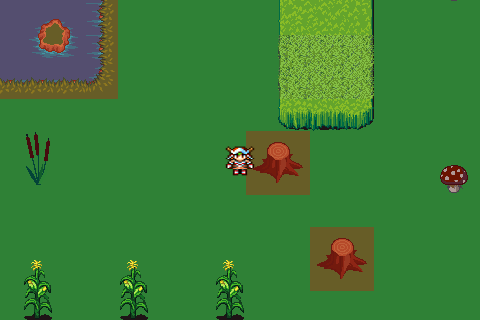
Sample game running with 2d map showing collision tiles shaded red. Code and graphic files available on github
2nd layer of collision tiles separated out of the 3 layer map by test scripts in the game example. Sample map included in the github package, available at the link above.
Since I'm still not completely recovered from the flu, I spent a few hours on Sunday working inside the house with my son on a 2D side-scroller game. I'm still amazed at how quickly games can be created in Pygame.
To get the background to scroll, we used the Surface.blit method to slice up one large panoramic photograph. We used Gimp to make the photograph look more like a cartoon. This method is sometimes called, "one giant image." The alternative method is to use tiles. Since we used tiles for the background in the previous game, I wanted to try the "one giant image" method and see if it slowed down my son's phone. Surprisingly, performance is completely fine.
In this implementation of the "one giant image" technique, we used the area argument of pygame.Surface.blit(). Most people use blit regularly with Surface.blit(image, rectangle). Many people stop exploring blit with just those two arguments. There's a few more tricks that are worth learning. blit will only use the upper left point of the rectangle as the point for the upper left corner of the surface. The size of the rectangle doesn't matter. A point such as (0, 0) will work the same as a rectangle. The more interesting argument is the area argument that comes after the destination point. Here's the method explained in the Pygame documentation.
The area argument can take a four integer tuple to slice from the source surface.
For example (0, 0, 480, 320) will source the far left edge of the giant image and take a segment that is 480 pixels wide. My son's phone has a screen that is 480 x 320. We're using slices that are the same size as the screen of the phone . By slicing a section 1 pixel to the right and then blitting that surface to the main screen, a stationary character in the game will appear to move 1 pixel to the right. In the game shown, the character is a blue smurf. The smurf is completely stationary on the x axis. The smurf appears to be moving horizontally to the right because the background is moving horizontally to the left. To enhance the illusion of movement, the smurf image rotates through a 16 cell animated sequence loop.
If the person playing the game looks at the town skyline in the background and the smurf in the foreground, the smurf will appear to move 1 pixel to the right every time through the loop. The second time through the loop, the sliced area will be (1, 0, 481, 320). The third time through the loop, the area will be (2, 0, 482, 320). The game in the video is running on 30 frames per second. The background is moved to the left at 30 pixels per second.
To create more of an illusion of movement, we're using parallax scrolling. Objects closer to the person playing the game appear to move faster than objects further away. The ground and cactus are moving toward the smurf at 8 pixels per cycle or 240 pixels per second. The larger trees are moving toward the smurf at 3 pixels per cycle or 90 pixels per second. The tree is an actual photograph of a tree that was edited to appear more like a cartoon tree.
Update: 2014 February 20
Video tutorial available.
Disneyland, the winter flu, soccer, surfing, school and work, these are all normal family activities. Learning to program in python often seems to fall down on the priority list, especially for my teenage son, who is often boiling over with energy. He'd rather be out running, hiking, fishing, or playing a team sport.
My son blocked out some time today for python programming and he decided to complete development of Swarm after finishing the eighth level. Each level now has a different map. He also changed the game fonts to more stylistic fonts he downloaded from the Internet. The video above shows all eight levels of his game running on a SamSung Galaxy Note II.
The levels are created with python code only. He decided not to use a map editor since the map size is small and manageable.
There is a story behind the game. The blue boy goes through different areas of the world looking for a girl that is imprisoned in a haunted castle. If the boy gets through eight levels, he saves the girl. A hero screen appears with the boy and girl enjoying a sunrise.
The next game he's working on is a 2d side-scroller game.
The distribution file and source code for Swarm are here.
The performance of python games is fine on old, cheap Android phones. My son has written several games for his cheap LG Optimus S phone with 170MB of memory. Although the games are slower than on a desktop, there are no problems with the speed of simple games on the phone.