Showing posts with label 2D Tile. Show all posts

Saturday, January 31, 2015

4th Grade Girl Python Coder - Tiled Map Creation


As fathers and mothers, we protect our children from disappointment.  In our quest to shield them from failure, we expect too little from them.  Every week, I am amazed by an ordinary 9 year old girl, banging out Python code in PyCharm from a blank screen.  Girl Coder represents one possible future of America.  Although in 20 years, she may be a baker, ballerina, housewife, or teacher, today she is a coder.

For many years, I had under the mistaken impression that kids under age 12 could not learn to program effectively.  I was wrong.  They can do it.  I made many mistakes as a parent-as-teacher with my first child.   The breakthrough insight for me came when I realized that almost all the books and curriculum out there was designed for adults.  At the time, back in 2011, most of the curriculum for children was still based on Java.  The bigger problem was that the curriculum was designed for adults, not children.  

Today, is just another Saturday stay-at-home morning for Girl Coder, age 9.  No surfing today as her brother took off to Tahoe for snowboarding and we decided to relax indoors for a change.  Piano and Python got her attention, not necessarily in that order.  :-)

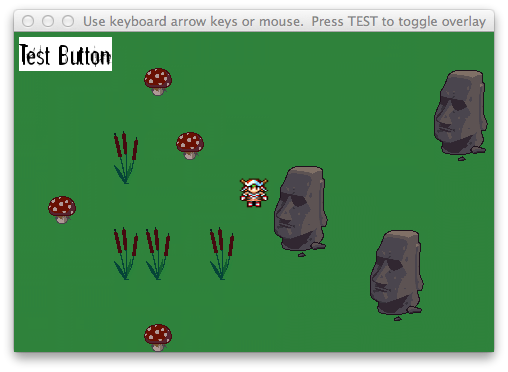
She built a tile map using Tiled today.  She then used PyCharm to write a Pygame program to move a  girl around a map. This is a modification of PyChildren Lesson 3, The Moving Square.


The first step to make the lesson easier for young children is to use Tiled to output a png file instead of a TMX or JSON file.  In this game, she is using one large image as the entire map.  By using an image instead of JSON or TMX data, we don't have to parse the data.  Girl Coder uses Tiled like a paint program.  She likes the stamps and bucket fills.  Within about 20 minutes, kids can build a pretty snazzy looking map for their games.

The modification to lesson 3 starts off pretty simply.  For this lesson, the girl stays in the center of the screen.  The map moves.   The first tricky part is that she needed to move the map to the left in order to move the girl to the right.   That's not too bad since you can immediately test and see that the girl is moving in the wrong direction and just change things from addition to subtraction.


The goal is to get the girl to appear to move to the right.

In order to do this, the girl remains stationary and the map moves to the left.


In order to move an image to the left, subtract 1 from the x-axis.


At this stage, I'm not sure if she understands the concept of moving the map to the left to get the girl to appear to be moving to the right.  I think it's okay if she doesn't get it.  I'll plan on going through the map lesson again from the beginning and have her implement bounds detection.  She's developing a story with the map.  There are scary places and places with treasure.

The sequence for this lesson.

  1. Blank Screen
  2. Stationary Square
    1. Modify lesson to blit the background map to the screen
  3. Moving Square
    1. Modify lesson to move the map around instead of the player
  4. Keyboard Input
    1. Using the keyboard instead of the touchscreen

At this stage you can stop.  it's cool to see the character move around a map that the child made.  it is somewhat unsettling to not have bounds detection and run out of map.   Since Girl Coder has completed this same drill a number of times, I added bounds detection to the lesson.

Challenge of Bounds Detection

The main challenge with the lesson is how to get the girl to stay on the screen.  To prevent the girl from moving left, it is relatively easy.  Remember, to give the appearance that she's moving left, you're moving the map to the right.  You move things to the right by adding 1 to the x coordinate.  If you name the x coordinate map_x, then you move the character to the right by adding 1 every time through the loop.  

So, what number does map_x need to be less than?  Well, if you started map_x at 0, then when you moved the map to left, you subtracted 1 every time through the loop.  map_x then existed only as a negative number.  As long as map_x is less than zero, you can add one to it.  As soon as the number gets to zero, stop adding numbers to it.

As this is confusing, let's look at the code.

The size of the map is 1216 pixels by 826 pixels. The size of the Pygame window that the game is played in is 480 by 320.  You'll need to help the child with this section.
Here's the entire code listing.

Read Previous Adventures of Girl Coder

Other Options If You Can't Teach Your Own Kids

My daughter also takes classes at LearningTech.org in Palo Alto.  The class is great.  It's run by Dr. Mark Miller and Dr. Len Erickson.  There are two levels, grades 1-3 and grades 4-5.  You may wonder if a 2nd grader can code.  Can they even type?  Yes, they can.  


At the beginning of 2015, it's more common to teach children to program.  The curriculum at LearningTech.org is great.  It resembles my PyChildren curriculum, though my curriculum is designed for one-to-one teaching.  I'm not sure which method is more effective for teaching, but the PyChildren method is designed to bond your kids, not just to teach them programming. 

Friday, December 13, 2013

JSON Map Loader for Android Games Written in Python (Pygame and PGS4A)

I recently changed my son's lesson on 2D tile maps to focus on creating a json_loader that can read in different types of maps.  json_loader will allow you to quickly create 2D tile games on Android.  It is for children learning to program in Python.  The example loader is not intended for production applications.   You can create fairly large maps with Tiled and have your player explore a small fanasy world.

The full source code for the loader is available on github.


You can get the package at the link above or with git.
  $ git init
  $ git pull http://github.com/codetricity/json_loader


 There are three skeleton program to get you started:


Maze.  This is the only game that is fun enough to be playable.  If you add a timer onto this game and a way to save the time scores, you'll have a fully playable game.  Even with the basic skeleton, the game is still playable.  You can create several maps with Tiled and then have a series of simple map games on your phone.


Adventure Map.  The game is fully playable with the character moving around the screen with either a keyboard or touchscreen.  The game doesn't have a layer to find things such as treasure or monsters.  You'll need to add this layer and write the code to take an action such fight the dragon with a sword.  For an idea of what to do with a map game, see my son's game Swarm that he developed when he was 13 years old.  Note that Swarm doesn't use json_loader.  Each map was created with Python code, not with a map editor.  It took a while to build the different levels.


Scroller. I also started on a 2D scroller game using json_loader.  The player scrolls and can jump around the screen.  However, the platforms don't work.  The character will fall right through the platform in the air.  I wrote a number of blog posts on 2D side-scroller games.  Here's another one.


Once you get the code, run the example program with:

$ python main.py

The default screen size is 480 x 320.

You can load a different map by opening main.py in a text editor and changing:

    map_file = "maps/map.json"


    map_file = "maps/test_map.json"

If you use test_map.json, you will have a maze game.

If you want to experiment, you can use the unfinished scroller game with:
  
  $ python scroller_example.py

If you do create a game with json_loader, take a video of the game and put a link to the video in the comments.


Tuesday, November 26, 2013

2D Tiles Games - More Algorithms to Slice Tilesets


Prior to heading out to go fishing, I came across this nice post on slicing a tileset into rows and columns.  The example uses Surface.subsurface, which I haven't been using effectively.


The author wrote a more elaborate tutorial here.

The author of bitcraft-PyTMX used the code below to handle tilesets.


I plan to review the code snippets above in more detail after the fishing trip.

Sunday, November 24, 2013

Pygame on Android App Crashes on Start: FIXED

A good tileset in the wrong place at the wrong time
After catching Jack smelt in Capitola and seeing an amazing display of seals, dolphins, and school of tens of thousands of fish, my son worked on his 2D tile map game, Maze.  The Android app consistently crashed on start.  It would display the initial splash screen and then die, leaving no error message.

This has happened in the past with other games.  We usually solve the problem with adb, the Android debugger.  Today, the fix was easy.  However, since I know that it can be daunting to wade through the adb logcat, I'll provide a few tips specific to Python / Pygame Subset for Android debugging.

My son's game uses Python and pgs4a.  He also uses Tiled to export JSON map files. 

First, find adb on your system.  It's not something that python developers normally use from the command line.  adb is in the platform-tools sub-directory of the android-sdk main SDK directory.

 
 From the Linux command line, you can either just run adb logcat or you can run it through grep and look for references to python.


 A larger snippet of the log file is shown below.


 In this case, the error was an incorrect reference to the tileset graphic.
  

The error is caused by a relative reference to a non-existent file.  Although the program works on the desktop, it doesn't work on the phone.  The fix is to place the tileset files in the same directory or sub-directory of your main.py program and create a new map and tileset with tiled.  If you've already created an extensive map, you can also edit the json file with a text editor to have it reference the correct location.

In this example, the file is called grass_water_terrain.png.

In a previous game, my son had a similar problem with the app crashing when it tried to load a font file that was in the wrong location.  Fonts and graphics are the two most common problems.  If you have all your fonts and graphic files in the same directory and your program still doesn't work on Android, but works on your desktop, you may be trying to import a library another directory.  Everything needs to be in the directory where main.py is or in a sub-directory.

If the application works on your desktop and it builds and then loads onto your phone fine, but crashes on start, think through what files the application is trying to load on the Android phone.  Then, work backwards and think through the differences between the phone directory structure and your desktop.  Also, think about the obvious things.  Check that you imported the android library and you've initialized it android.init().

If the problem is not immediately obvious, fire up adb and look for references to python.

Checklist:

  • import android library
  • initialize android library
  • main game file is called, main.py
  • graphic files are in the main or sub-directory
  • font files are in the main or sub-directory
  • custom libraries that you wrote are in the main or sub-directory

Update: March 3, 2014
One of the viewers of my pychildren YouTube channel had a problem with sound.  The important section is to map pygame.mixer and android.mixer to mixer.


try:    import pygame.mixer as mixer except ImportError:    import android.mixer as mixer

The other problem with sound is that there may be problems with different types of sound formats.  I suggest you use .wav files.  Since sound is handled differently on Android and the desktop, a few problems occur.


Monday, August 26, 2013

Tiled JSON Map Loader Example Code Available

Someone asked me for the source code for the JSON map loader example I created for a video tutorial on using Tiled to export 2d tile maps as JSON map files. Although .tmx is a more popular format, Pygame Subset for Android does not support the xml parser libraries.  Because of this, we can't use the TMX Loader library available on the Pygame site.  Pytmxloader also will not work.  This is unfortunate since the pytmxloader is especially nice.  Although these libraries will work on the desktop.  They will not work on the Android phone.  :-(

At some point, I was planning to write a library for JSON map file loading.  However, I never got around to it.  The code below will work on desktop and mobile phones.  It is for educational purposes only.


JSON Map Loader Lesson Code that works with Tiled maps.


Friday, May 31, 2013

Lesson 6 - Putting it all together - Python tile game on Android


Middle school student teaches a lesson on getting a character to walk around a map.  The map was created with Tiled.  It is a single image saved in png format.  The character can now move in all four directions.

Sunday, March 10, 2013

2D Tile Game Map - Building the JSON Map File


I created a video of a very simple 2D tilemap game running on the desktop and an Android phone.  The video focuses on creating a json map file.  The video will take you through step four of the process listed below:

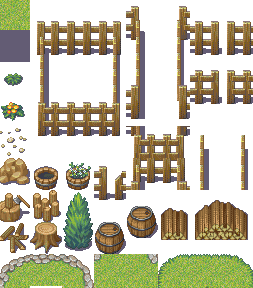
  1. Assemble tilesets which are pictures of grass, trees, water, rocks, bushes, houses and other graphics in the game;
  2. Assemble other sprites for graphics such as the character running around the screen;
  3. Create map data file using the Tiled map editor;
  4. Export the file to JSON format;
  5. Create a map loader in python;
  6. Use pygame to display graphics and handle player interaction;
  7. Use Pygame Subset for Android to package the Python application in Android Package format
I didn't cover how to write the map loader in this video since that video may take a long time.  The loader itself is less than a 100 lines of code.  The data structures are a bit more complex since Python loads the json file into the Python program as a nested dictionary structure.

Update Dec 2013:  Check out the code for an improved json_loader on github.

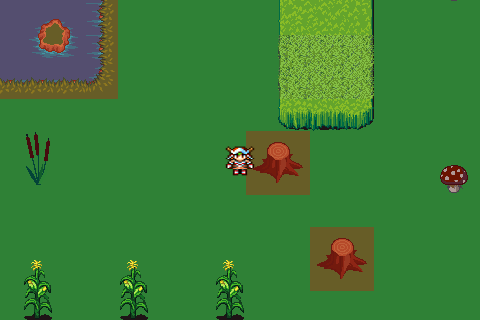
Sample game running with 2d map showing collision tiles shaded red.  Code and graphic files available on github

2nd layer of collision tiles separated out of the 3 layer map by test scripts in the game example.  Sample map included in the github package, available at the link above. 
Update December 13, 2013
Wrote a new blog post on using json_loader with examples of different types of games.

Sunday, March 3, 2013

Pygame Animation Tutorial Video


Here's a short howto video that starts off with a completely blank screen and takes you to a working animation.

I suggest you watch the video is full screen mode to see the text properly.

Friday, December 21, 2012

Swarm, Sprites, Opacity, and Zombies


The winds are whipping around outside my window.  Although we planned to go surfing in Santa Cruz today, the rain and wind are making our surf outing look grim.

I decided to help my son work on his new game, Swarm.  Wow, surfing or Python programming... Well, he's a typical teenage boy, he'd rather go surfing.  But, we can't control the weather, so he's stuck with Pygame.

The concept of Swarm is to have a player face increasingly larger waves of swarming zombies.  It's a classic game with the ability to move and shoot in four directions.  The game is designed to work on his LG Optimus S Android phone with a screen size of 480x320.

The left thumb controls movement.  The right thumb controls firing.  There are unlimited bullets in the current version.  He takes a great deal of satisfaction is blasting through 20 zombies.

This is the first time we've used transparency.  For the controls, we learned that the transparency can be handled with Gimp.  In the layers window, there is a slider bar for Opacity.  For other surface objects, we're using the set_alpha method of the Surface class.


The grass and trees are made from 32x32 pixel tiles.  They're not set in a map right now.  My son is planning the game to involve going through a series of rooms.  He doesn't need to put the tiles into a map right now.

The swarm algorithm for the zombies to chase the player is pretty basic.  We're simply tracking the position of the player and move the zombies 1 pixel toward the player in both the x and y axis for every frame.  The frame rate is currently set to 30 frames per second.


 The trickier bit was how to handle the zombie crowding problem. We've got it set now to simply check for zombies colliding with each other using pygame.sprite.spritecollideany.


Sunday, September 30, 2012

Tiled Map Editor

In addition to thinking about moving my student's shooter game to the web, I've been thinking of the next type of game to work on.

Right now, I'm considering a tile map game.  This Tiled Map Editor looks interesting.

It listed these tools that work with Tiled on Python:

  • Pygame map loader by dr0id
  • PyTMX by Leif Theden (bitcraft)
  • tmx.py by Richard Jones, from his 2012 PyCon 'Introduction to Game Development' talk.
  • pytmxlib: library for programmatic manipulation of TMX maps


I'm hesitant to go down the path of making a 3D First Person Shooter (FPS) game with PyOgre or Panda3D.  I haven't looked at things like Kodu too much, though it does seem similar to Alice.

I also found an interesting Game Based Learning Wiki.